

Make AI video look real: light, motion and camera
A clip reads as fake for three reasons: light with no source, a body with no weight, and a camera that no one is holding. The fix for each is a sentence, not a setting. We rendered every fix before and after on Kling v3, and the whole prompt on Seedance 2.5 as well, so you can see which instruction arrived.
- 8 min read
To make AI video look real, fix three things in the prompt: where the light comes from, how weight moves through the body, and how a camera would behave if a person were holding it. "Realistic" and "cinematic" are not instructions; a lamp, a footfall and a shoulder-mounted camera are.
Every pair starts from one medium prompt with the three weak lines in it, then swaps exactly one line for its strong version. Same model, same length; Kling v3 takes no seed, so each run is a fresh roll. We ran the pairs on Kling v3 at 720p and 5 seconds, and the finished prompt on Kling v3 and on Seedance 2.5 at 480p.
What makes a clip look fake
| Tell | Why it happens | The fix |
|---|---|---|
| Lit evenly from everywhere | No source was named | One key with a direction and a colour, then a rim or fill |
| The walk floats, the feet slide | "Walks toward the camera" has no weight in it | Where the heel lands, how the hips carry each step, what the clothes do |
| The frame is glued to a rail, or wanders off | "The camera follows him" names a result, not an operator | Handheld or shoulder, walking backward at his pace, sway and micro-shake |
| Plastic skin, sharp front to back | "8k, hyperrealistic" asks for polish | Grain, halation, skin texture, and something in the frame that falls soft |
Before you start
- One performer and one light you can name: a street lamp, a window, a work lamp on a stand.
- Write the medium prompt first: subject, place, and the three weak lines. Then swap one line at a time.
- Keep the length and size the same for every run. Expect the rest of the frame to move between runs.
- Judge each pair on the one thing you changed.
Fashion film, one continuous take, real-time, night. SUBJECT: a man of 28, tall, dark wavy hair, olive skin, a long camel wool coat buttoned closed, a black turtleneck, wide charcoal trousers, chunky black boots. LOCATION: a narrow rain-wet alley, black asphalt with puddles, brick walls, light drizzle. LIGHTING: moody cinematic lighting. ACTION: he walks toward the camera. CAMERA: the camera follows him. LOOK: 35mm film grain, halation on the lamp, wet reflections, deep shadow with detail. No text, no logos, no readable signage.
Light: name the source, the direction and the colour
Light is the fastest tell. Name one key, say where it is and what colour it is, give the shadow side one fill, and say what is in the air.
LIGHTING: moody cinematic lighting.
LIGHTING: one orange sodium street lamp high behind him as a backlight, rimming his hair and shoulders and glittering in the puddles; a cyan glow from an unreadable neon tube on the wall camera-right as the only fill on his face.
Weak line
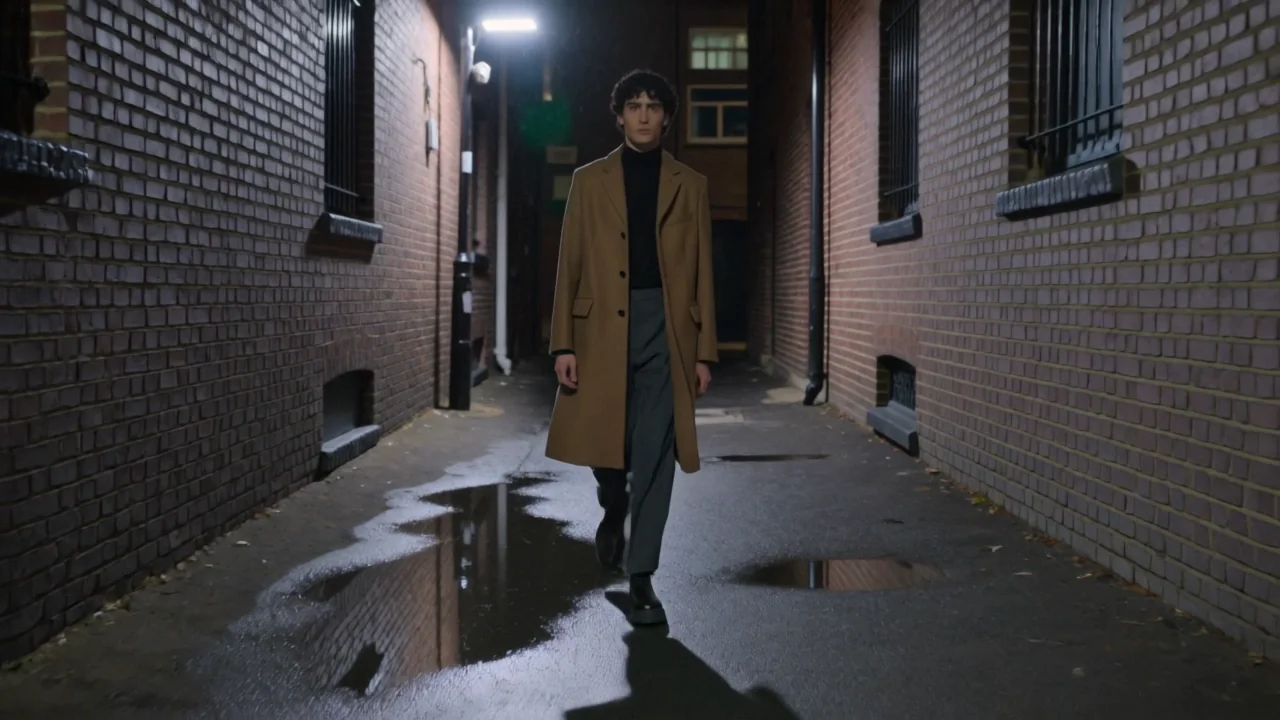
Source named
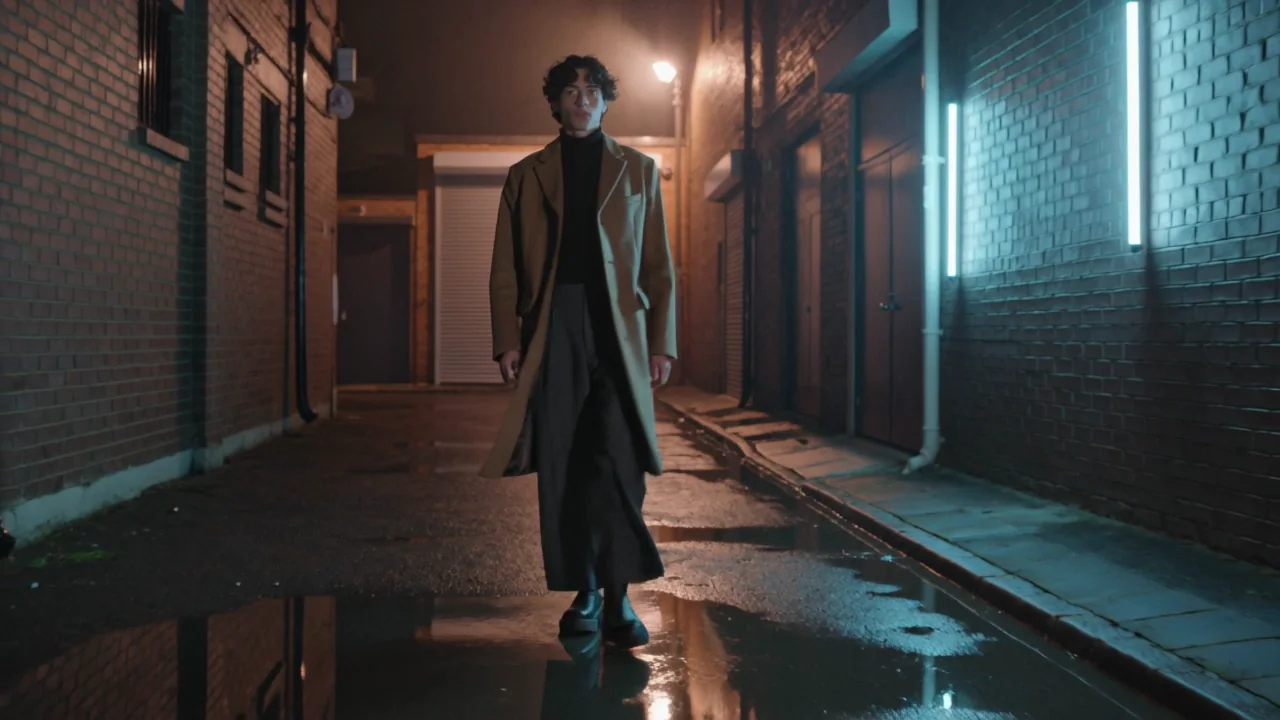
Motion: give the body weight
A walk with no weight is the second tell: the feet slide, the coat hangs still. Say what each step does, what the clothes do, and what the hands touch. For weight, contact and timing in dance and performance, see Make AI people move realistically.
ACTION: he walks toward the camera.
ACTION: he walks straight toward the camera at an unhurried pace, each step landing heel first with a visible weight shift, the coat swinging with each stride; halfway through he lifts his right hand and turns up his coat collar, four fingers on the outside of the collar and the thumb inside, then lets the hand drop.
Weak line
Weight named
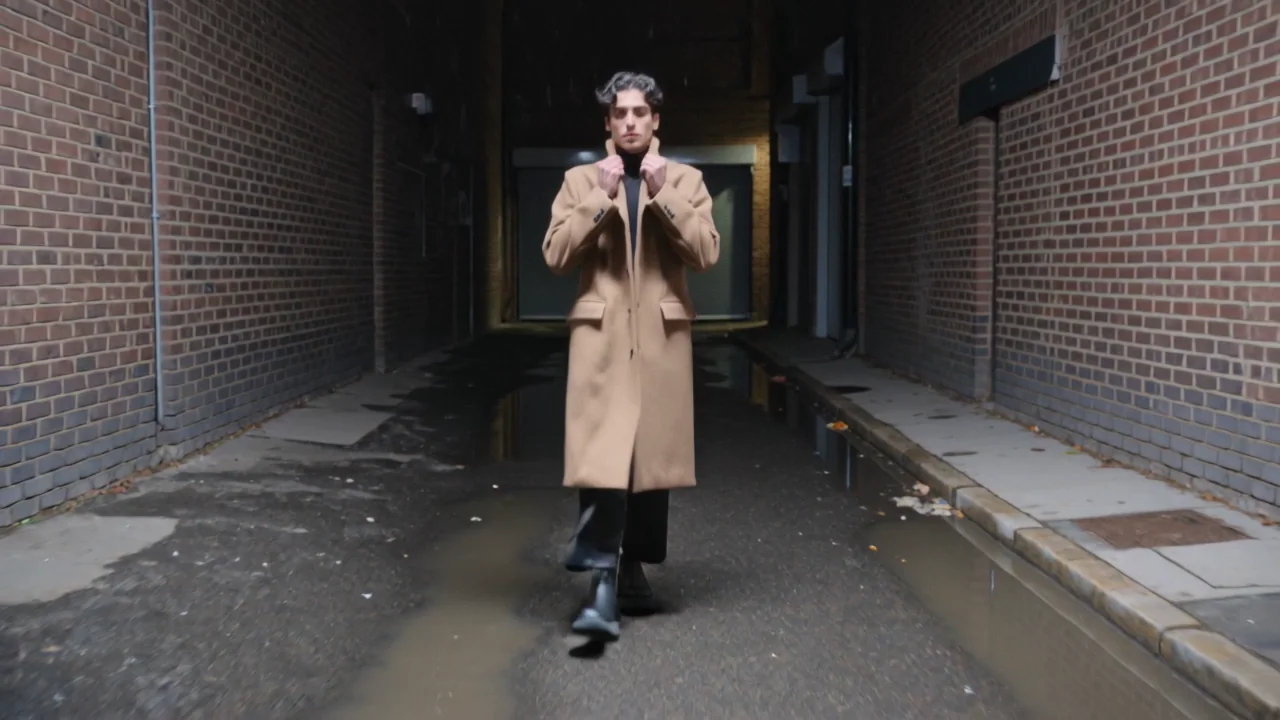
Camera: give it a person
A perfectly smooth frame is a tell of its own, and a camera with no operator wanders. Say who is holding it, how they move, and where the focus sits. Or pick Handheld from the camera move row in the composer and choose the strength; the move is added to your prompt as its own sentence.
CAMERA: the camera follows him.
CAMERA: handheld, walking backward at his pace, chest-up framing, natural sway and micro-shake, focus locked on his face, the alley behind him falling soft.
Weak line
Operator named
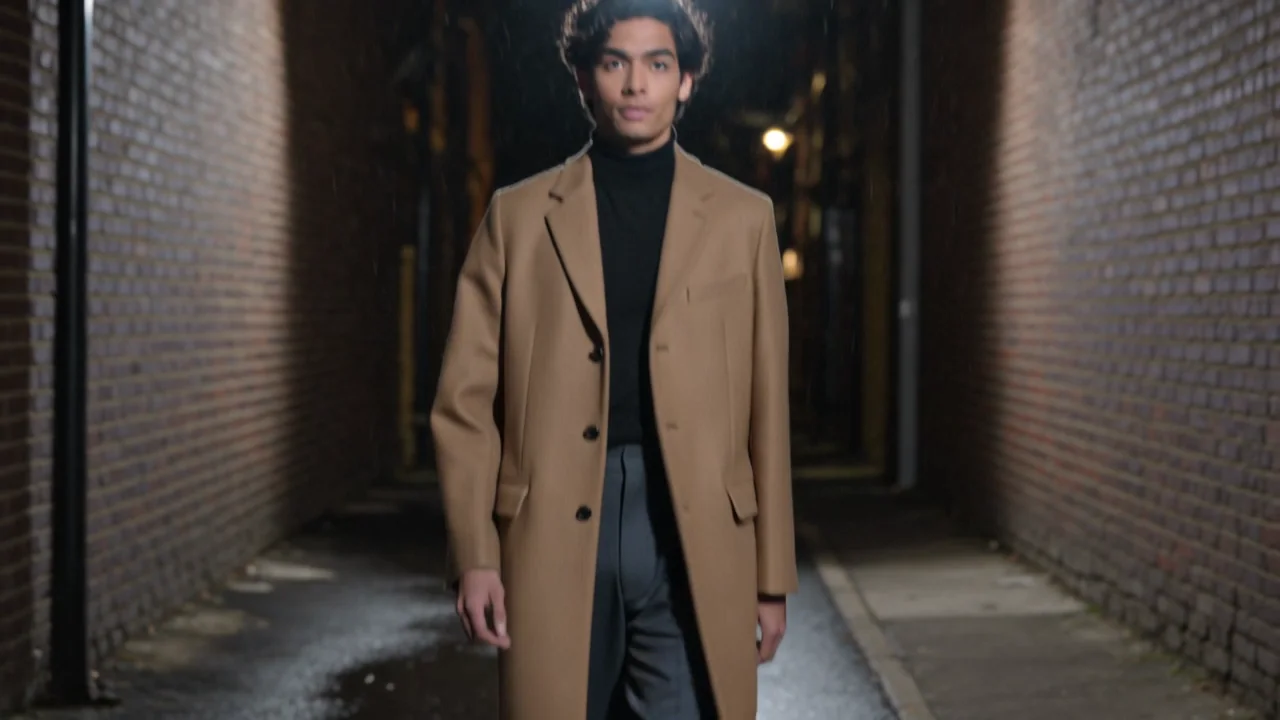
Which model listens to which instruction
We scored each line by one question: did the thing it asked for arrive? Kling v3 got one line at a time; Seedance 2.5 got all three at once, at 480p. This is what we saw on this scene, one run per cell.
| Instruction | Kling v3, one line at a time | Seedance 2.5, all three lines |
|---|---|---|
| A named light source with a direction and colour | Arrived as written: the lamp behind him, the cyan tube on the right | Arrived: the lamp high behind him, a cyan fixture on the right wall |
| A walk with heel strikes and a coat that swings | Arrived; the collar went up with both hands, not the right hand alone | Arrived, with the right hand on the collar as written |
| A handheld operator walking backward, chest-up | The backward walk arrived; the framing ended waist-up, not chest-up | Framed him full length, not chest-up |
Watch for this:The framing is the line that slipped. Both models held the light and the walk. Neither held chest-up: Kling v3 opened on the boots and closed to waist-up, and with all three lines in one prompt both models framed him full length. Check the frame size before you build on the clip.
All three lines together
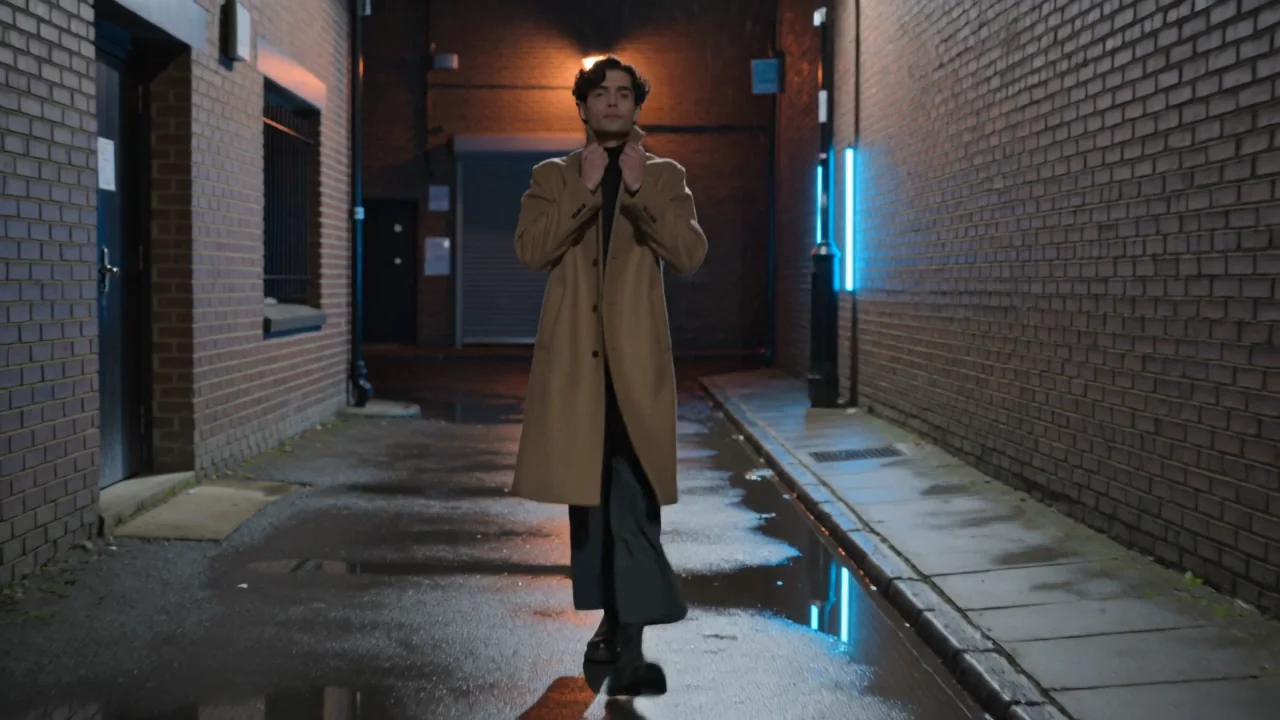
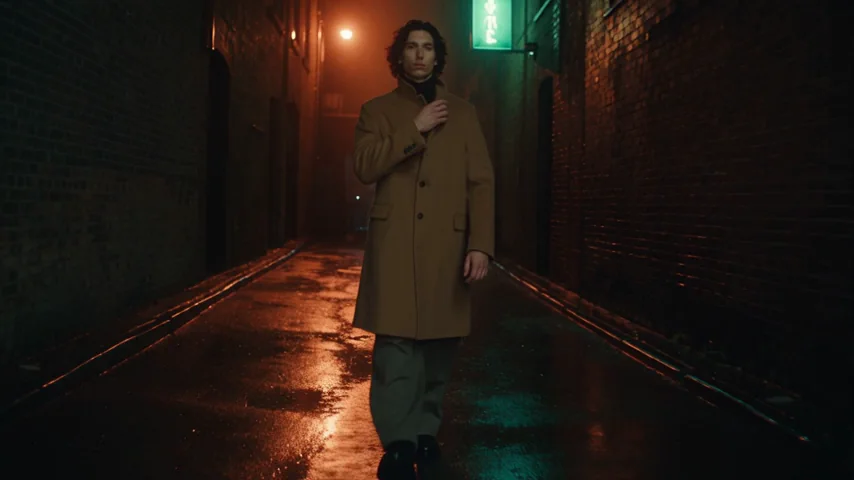
Fashion film, one continuous take, real-time, night. SUBJECT: a man of 28, tall, dark wavy hair, olive skin, a long camel wool coat buttoned closed, a black turtleneck, wide charcoal trousers, chunky black boots. LOCATION: a narrow rain-wet alley, black asphalt with puddles, brick walls, light drizzle. ACTION: he walks straight toward the camera at an unhurried pace, each step landing heel first with a visible weight shift; halfway through he lifts his right hand and turns up his coat collar, four fingers on the outside of the collar and the thumb inside, then lets the hand drop. CAMERA: handheld, walking backward at his pace, chest-up framing, natural sway and micro-shake, focus locked on his face. LIGHTING: one orange sodium street lamp high behind him as a backlight, rimming his hair and shoulders and glittering in the puddles; a cyan glow from an unreadable neon tube on the wall camera-right as the only fill on his face. LOOK: 35mm film grain, halation on the lamp, wet reflections, deep shadow with detail. No text, no logos, no readable signage.
Three ways to run this
- Fastest: open the video composer, paste the strong prompt, pick Kling v3 (Kling 3.0 in the model menu) or Seedance 2.5, and press Generate. The price is on the button.
- Hands-off: describe the scene to the NOLGIA Agent and ask for a named light, a walk with weight and a handheld operator. It writes the lines and renders.
- Most control: the API takes the same prompt, so you can run the weak and strong lines against each other on several models and keep the job records.
| Job | Use | Why |
|---|---|---|
| A handheld or dolly move without writing it | Camera move row, strength picker | Appended to your prompt as its own sentence |
| Grain, halation, a film stock after the render | Colour grade in Studio | Looks and film stocks on the timeline, no re-render |
| The same scene on several models | Explore, or the API | Every model previewed by its own output; one quote per run |
What it costs
Test each line at 5 seconds on Kling v3, or at 480p on Seedance 2.5, and render the keeper once. The price is on the Generate button before you spend anything.
Kling v3Pro and up
Per 5s clip (audio on by default)
720p 35 credits · 1080p 47 credits · 4K 117 credits
Seedance 2.5Pro and up
Per 5s clip
480p 26 credits · 720p 56 credits · 1080p 137 credits
1080p renders at 16:9 and 9:16
Read live from the catalog when this page loads. Every price is shown before you generate. See every rate.
Where you still regenerate
- The camera did its own thing. Run again before you rewrite; a new run is a new roll. Ours kept the move and lost the frame size.
- The light appeared in the wrong place. Say camera-left or camera-right, behind or above; a direction word is cheap.
- The face changed between runs. Expected without a reference image, and we make no promise about it. Judge each clip on its own.
- Two people in frame. One performer per test.
Five things to check before you call it done
- The light has a source you could point to, and the shadows agree with it.
- The walk has a footfall; the clothes move with the body.
- The camera is where you put it, not behind the performer's back.
- Something in the frame is soft.
- It reads as filmed at a glance, not only when you squint.
Questions and answers
- Why does writing "realistic" not make the clip real?
- It is not a physical instruction. A lamp with a direction, a heel that lands, a camera on a shoulder: those are things the model can render.
- What is the biggest tell?
- Light with no source. A subject lit evenly from every side flattens the frame before anything moves.
- Which model is best for realism?
- For anything that walks, turns or carries weight, Kling v3 or Seedance 2.5. The table above shows what each did with the same lines on one scene. Run your own scene before you commit.
- Do I still write the camera if I use the camera move row?
- No. The row adds the move to your prompt as its own sentence, at the strength you pick. Write the light and the motion yourself.
- How do I know a fix worked?
- Render it against the previous version and compare them side by side. The composer keeps every run in your Library.
Name the light in your next clip
Open the video composerRelated guides
Prompting
Seven video prompt mistakes, and the fix for each
The seven ways a video prompt goes wrong, each rendered twice on Kling v3: the vague prompt, then the same prompt with one fix. Copy the fixes, and read what a seed does not do.
· 11 min read
Prompting
Make AI people move realistically: weight, contact and timing
People move badly in AI video when the prompt names an action, not its physics. One backflip on four models from the same frame, plus three pairs on weight, contact and timing.
· 11 min read
Blog · Comparison
One prompt, six video models, nine measured checks
One prompt with nine checkable details, sent to six AI video models twice each, and every clip measured with a detector, text reading and camera tracking.
· 12 min read